Signalment Assistantdrafts the study from your protocol

Electronic data capture for veterinary field studies

Run your veterinary study in one connected workspace.

Bring clinic visits, owner reports and study review together, so your team can see what needs attention and keep the study moving.

A 20-minute walkthrough, set around your study. The Pilot plan is free.

Example data
The Sites page of an example four-clinic study: subjects, owner check-ins, clinic visits, overdue visits, open queries and adverse events for each clinic, with the four things to look at for Harrowgate Veterinary Clinic beside the table.
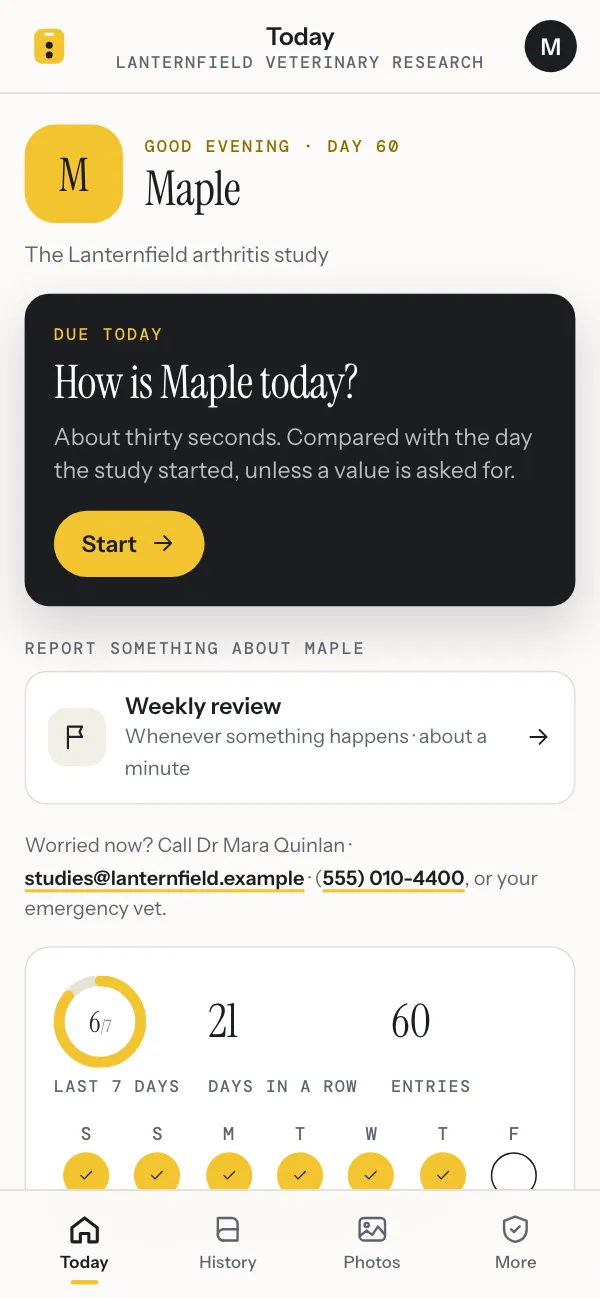
An owner’s phone in the same study: today’s check-in for Maple is due, with a Start button, and a way to report something between check-ins.

Example study CMF-2026. The organizations, people and animals are fictional.

Coordinate

See which sites need attention.

Every clinic side by side: overdue visits, open queries, adverse events and owners who have stopped checking in. Each site gets its own list for the day.

HVC · 1 serious event open · 2 visits overdue, oldest 9 days · 4 queries, oldest 34 days

See how

Collect

Hear from owners between visits.

Owners consent and check in from their own phones, with photos and short videos. What they report reaches the team the same day, and someone decides what each note is.

CMF-018 · daily check-in · “Vet appointment next week for a dental, is that allowed?”

See how

Supply

Keep every clinic stocked.

The supply chain knows what each clinic holds, what every dog has at home and the day each runs out. Shipments are built from those needs, with the carrier’s label and a packing slip.

RVH · 475 chews · 22 days at the current pace · empty around Nov 15

See how

Review

Review records with their history.

Queries, source verification and sign-off work from one queue. Every change keeps its reason, its author and the version before it.

CMF-002 · physical examination · version 3 · source verified · signed off

See how

Signalment Assistant

Hand it the protocol. Check what it drafts.

Signalment Assistant does the reading and drafting that slows a study down: the set-up from the protocol, a reviewer’s pass over it, data checks, clinic records and adverse-event coding. Your team decides what stays.

Set up

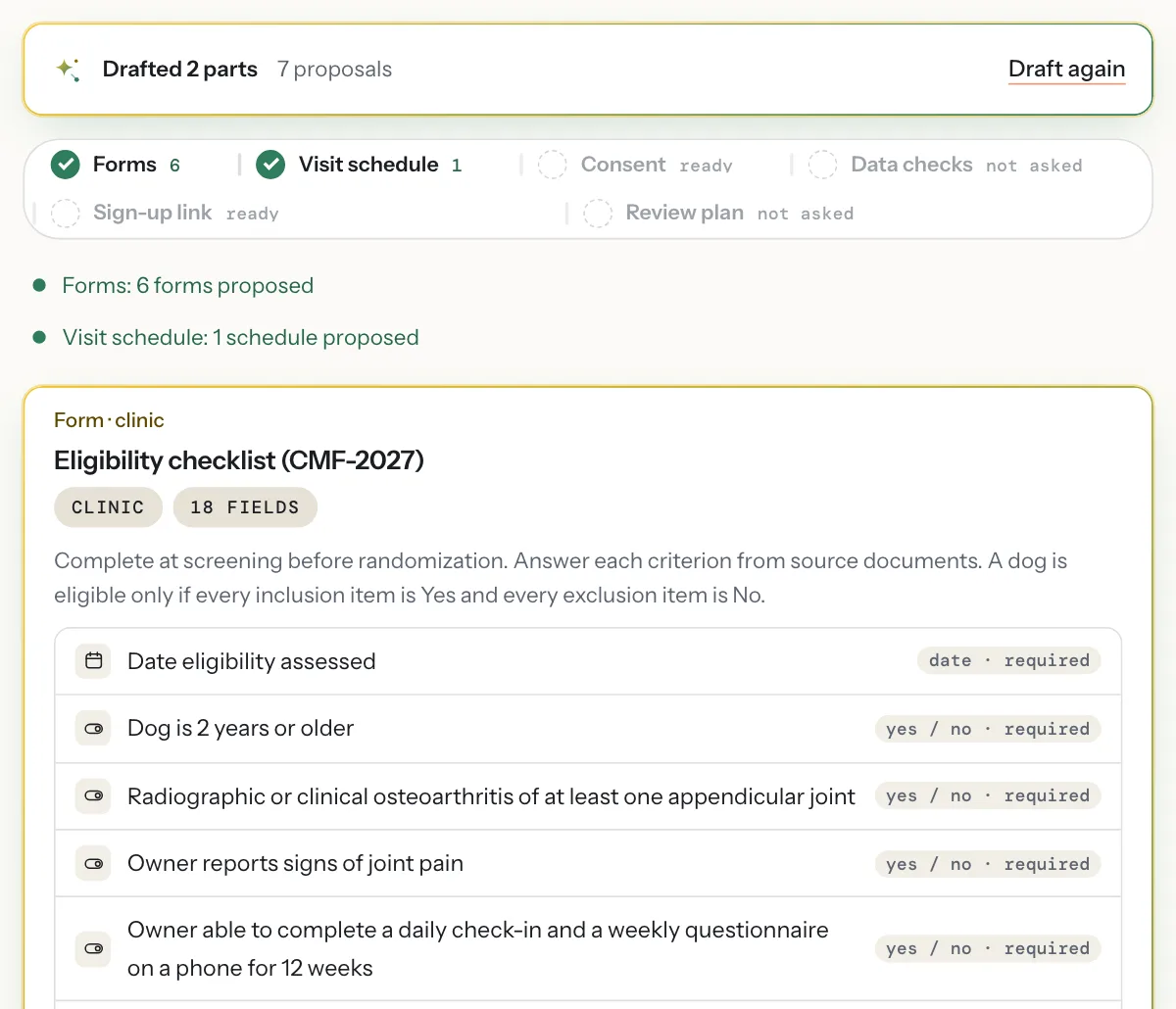
Forms and a visit schedule, drafted from the protocol.

Upload the protocol, or describe the study in a few lines. The assistant proposes the forms, the visit schedule, the consent text, the sign-up questions, the data checks, the review plan and, for a study that dispenses product, the components, dose table and devices of its supply chain. Each proposal meets the same rules as a form your team builds by hand, and you accept them one at a time.

  • Reads a PDF, a photo of a page or the protocol text
  • Says why each form and visit is there
  • Nothing is added until someone accepts it
See it in a demo
Example data
The assistant’s drafts for a new study in the example workspace: forms and a visit schedule proposed from the protocol, with the first proposed form, an eligibility checklist of 18 fields, open for review.

Protocol

A reviewer’s reading of the protocol.

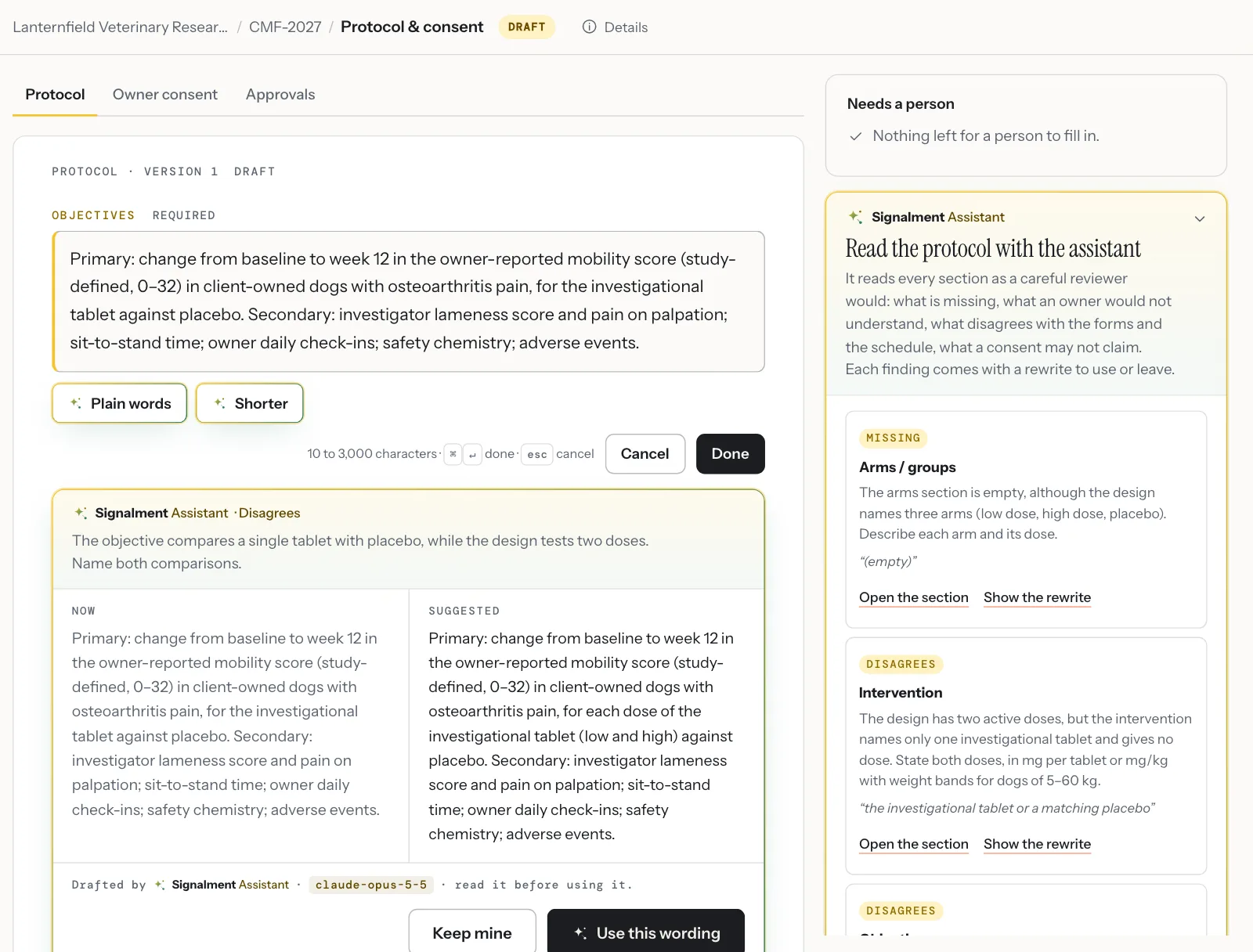
It reads every section for what is missing, what an owner would not understand and what disagrees with the forms and the schedule. Each finding quotes the words it is about and comes with a rewrite to use or leave. The consent gets the same reading.

  • Findings beside the sections they concern
  • A rewrite shown next to the wording it replaces
  • Nothing changes until you use it and save
See it in a demo
Example data
The protocol of a draft study with the assistant’s reading: a finding that the objective names one tablet while the design tests two doses, its suggested wording beside the current one, and more findings in the margin, each quoting the protocol.

Data checks

The checks a data manager would set.

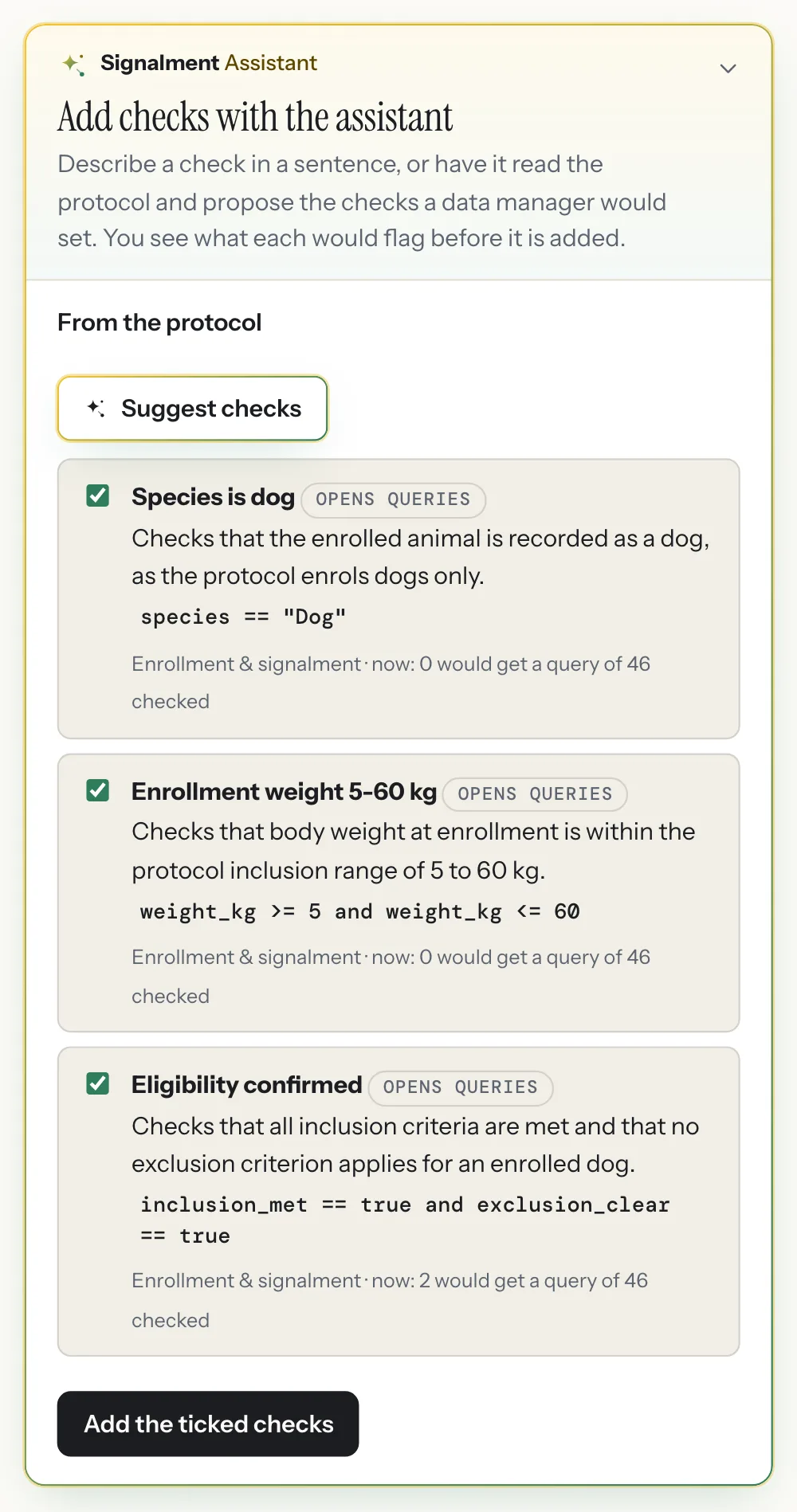
From the protocol and the forms it proposes data checks before the first animal is enrolled: inclusion criteria, ranges, dates in order. Each one shows how many records it would query in the data already entered, so the useful ones go in and the noisy ones do not. A check can also start as a sentence.

  • Each rule compiled against the study’s own forms
  • What it would flag now, before it is added
  • Queries open by themselves once it is on
See it in a demo
Example data
The assistant’s suggested data checks for the example study, each with its rule, the form it runs on and how many records it would query now, with a button to add the ticked checks.

Clinic records

A lab report, read into the record.

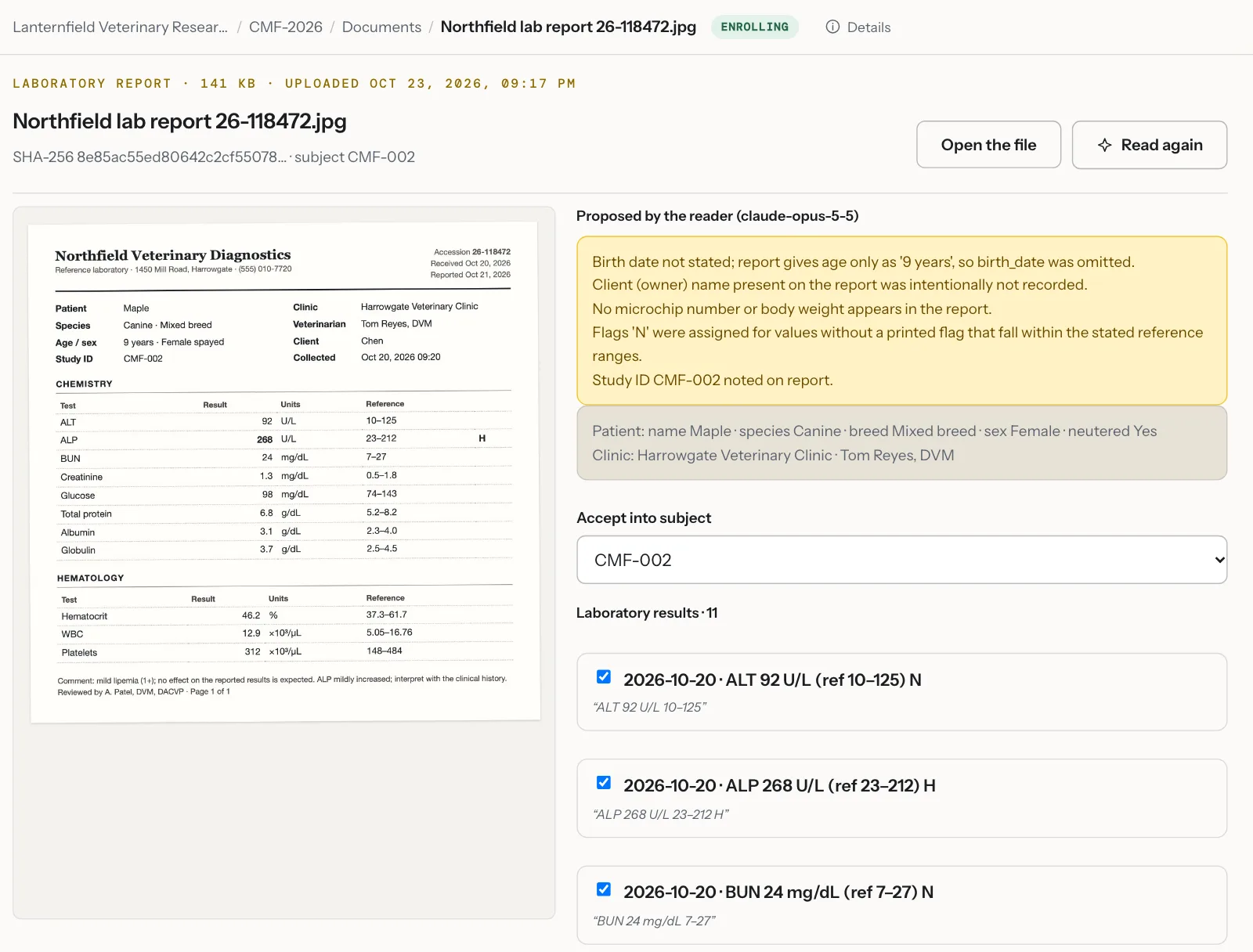
Upload a scan or a PDF from the clinic. The reader proposes each result and history line with the words it came from, and notes what it left out and why. Owner details are never proposed. The lines you tick become records linked to the document.

  • Every line carries its source quote
  • Results with units, reference range and flag
  • Accepted lines keep a link to the file
See it in a demo
Example data
A laboratory report uploaded for one dog in the example study, beside the reader’s proposals: notes on what it left out, including the owner’s name, and each laboratory result with its reference range, flag and the words it was read from.

Adverse events

Adverse events coded to VeDDRA.

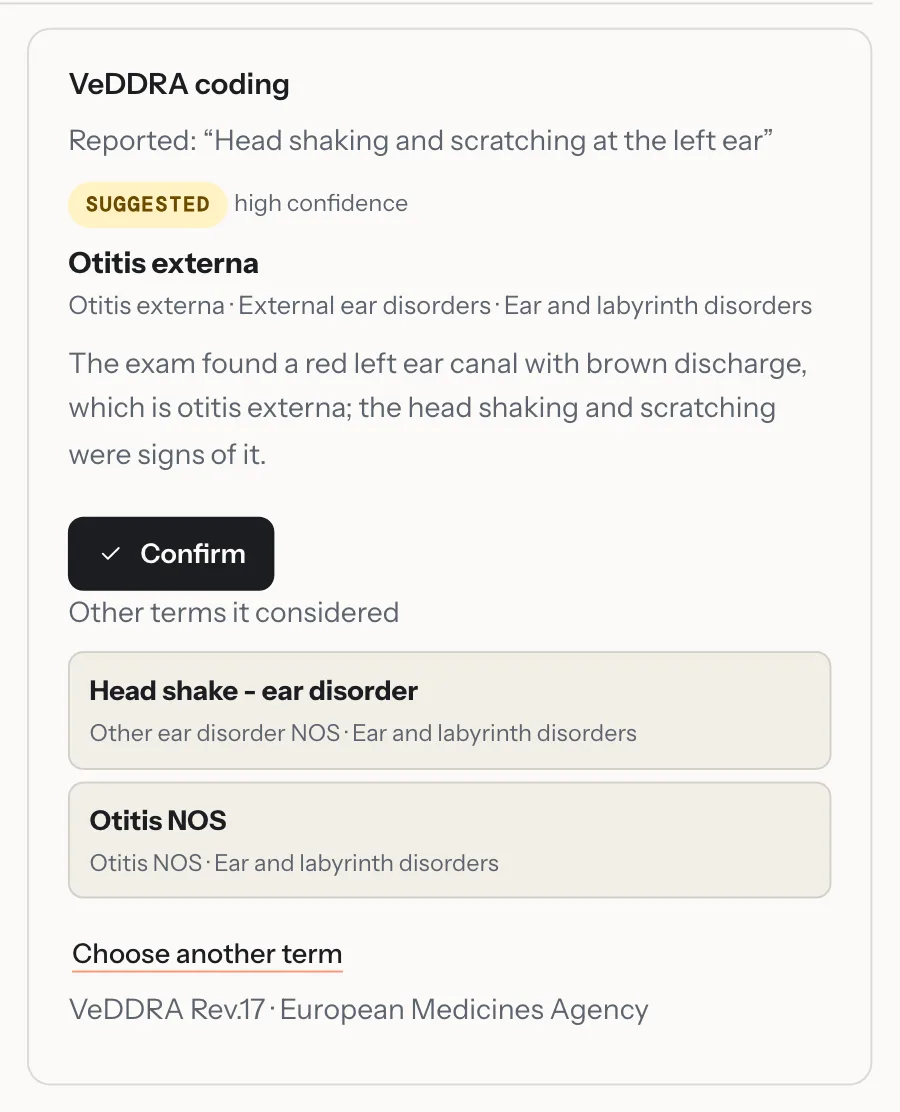
The words the site recorded go to the assistant, which suggests a VeDDRA term with its confidence, its reasoning and the other terms it considered. The investigator confirms it or chooses another from the dictionary, and the export carries the coding.

  • VeDDRA, the European Medicines Agency’s dictionary
  • Confirmed by a person before it counts
  • Marked for coding again if the event’s words change
See it in a demo
Example data
The VeDDRA coding of an adverse event reported as head shaking and scratching at the left ear: Otitis externa suggested with high confidence and a reason, a Confirm button, and two other terms it considered.
  • Off until you turn it onA workspace owner turns it on, and can turn each task on or off.
  • A proposal, never an entryNothing reaches a study record until a person accepts it.
  • On the audit trailWhat was proposed, what was accepted and which model proposed it.
  • Not used for trainingWhat it reads is sent to Anthropic under terms that do not permit training on it.

The answers on these screens are the assistant’s own, on the example study. Ask how to do anything with ⌘/: the answer links to the page, and it never sees a record or a name.

Product walkthrough

Coordinate, collect, supply, review.

Four views from the example study, as your team would see them.

Coordinate

Start the day with your site’s list.

Today puts a coordinator’s work in order: overdue clinic visits first, then the visits open now, owners to contact and queries to answer. A visit starts from the list, or is recorded as missed.

  • Overdue visits, with the window each one had
  • Owner notes waiting for a decision
  • The week ahead, day by day
See it in a demo
Example data
Today for the coordinator at Harrowgate Veterinary Clinic: one serious adverse event open, two clinic visits overdue, the oldest by nine days, with Start visit and Record as missed, the week ahead and the day’s counts.

Collect

Owner reports that arrive complete.

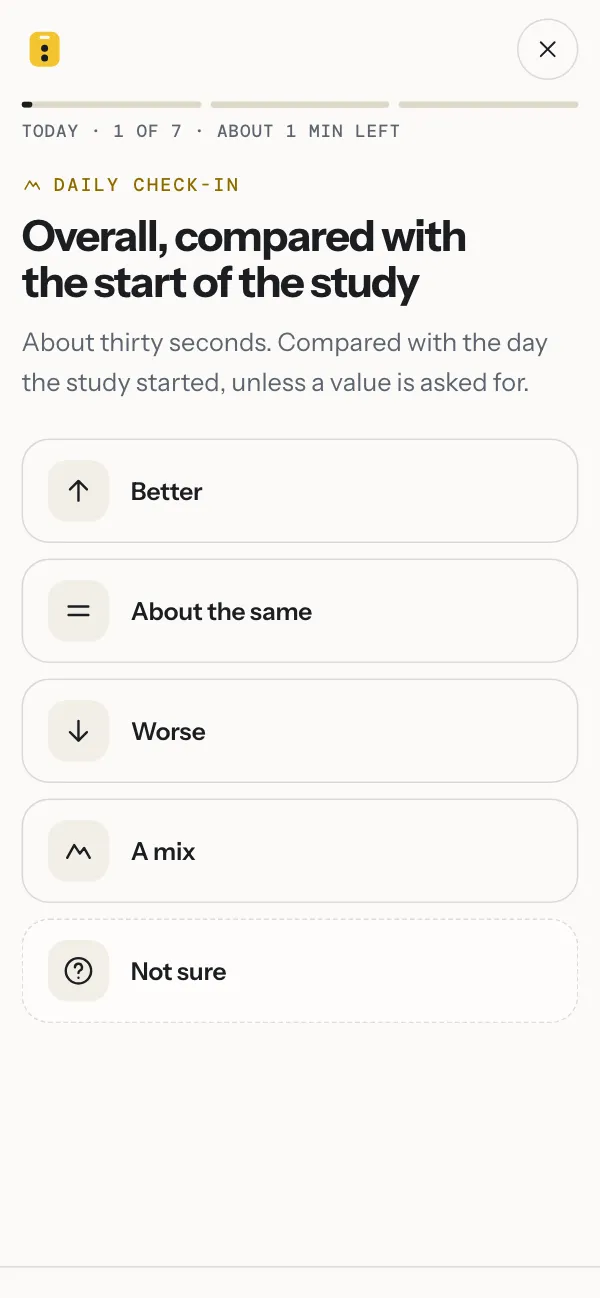
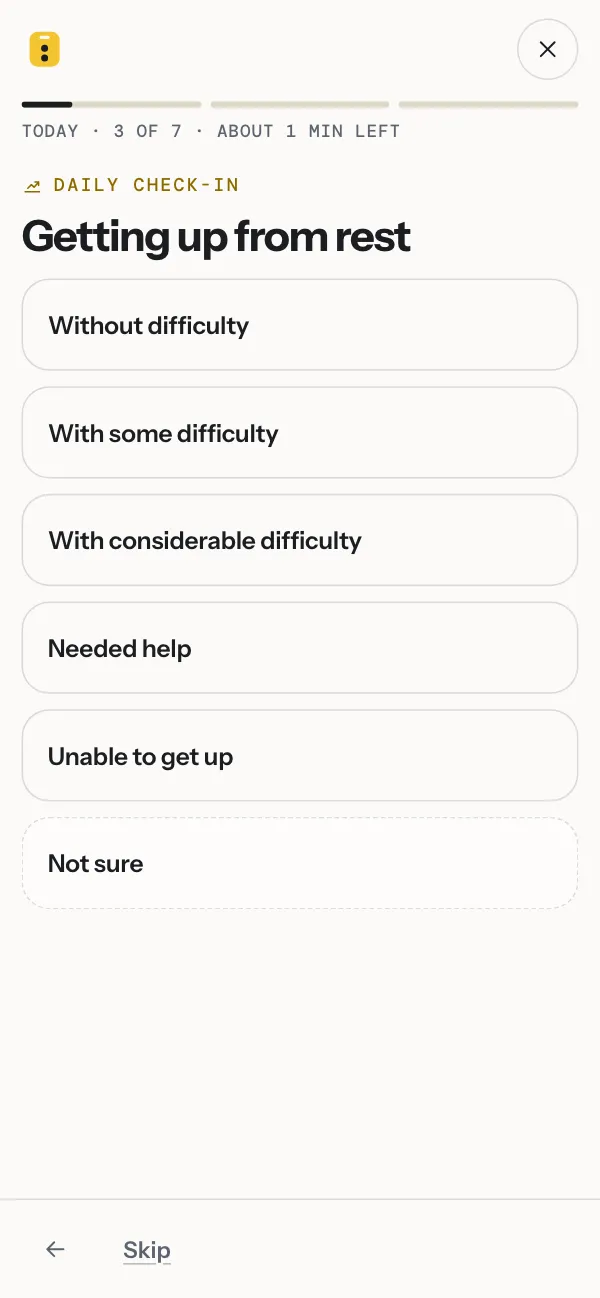
Owners answer one question per screen from a link in an email, in about a minute. Reminders follow the study’s schedule. Each entry carries the time it was made, and a missed day stays a gap.

  • eConsent signed on the owner’s phone
  • Daily or weekly check-ins, photos and questionnaires
  • Each note sorted as a possible adverse event, a question or routine
See it in a demo
Example data
The first question of a daily check-in on an owner’s phone: overall, compared with the start of the study, with five answers from Better to Not sure.
A later question of the same check-in: getting up from rest, from Without difficulty to Unable to get up.

Supply

Every site stocked before it runs out.

The supply chain reads the ledger and the dose table: what each clinic holds, how many days that lasts at its pace, and what every dog has at home until its next visit. A shipment is built in four steps from what a place needs, with the carrier’s label and a packing slip.

  • Stock by place, with the day each site runs out
  • Needs per dog, from the dose table and what was handed over
  • Coded kits, lots and devices tracked to the owner and back
See it in a demo
Example data
The supply chain overview of the example study: stock by place for the depot and four clinics, each component with its count, days left and what is on its way, and below it the stock over the last 90 days with the dashed forecast to the day each site runs out.

Review

Queries, checks and sign-off in one place.

Data checks raise a query the moment a value is saved. The monitor reads the record beside the question, the site answers where it was asked, and the investigator signs off by visit.

  • Checks written before the first animal is enrolled
  • Source verification and sign-off by the study’s own plan
  • Signatures that ask for the password again
See it in a demo
Example data
The monitor’s queries: six open, each with its site, form and field, most raised by a data check; beside the list, an adverse event record with the field in question marked.

Example study CMF-2026: a two-arm, double-blind study across four clinics. The organizations, people and dogs are fictional; every screen is the current product.

Video from home

Some things are easier to see than to describe.

A check-in can ask for a short video: a dog’s walk, a cough, a scratch at an ear. The owner films it on their phone, and it is on the dog’s record that day, stamped with the time it was sent.

  • Recorded in the check-in, or chosen from the phone’s library
  • The study’s own instructions, so each week is filmed the same way
  • Played on the record by the study team, and queried like any other value
See it in a demo
Example data
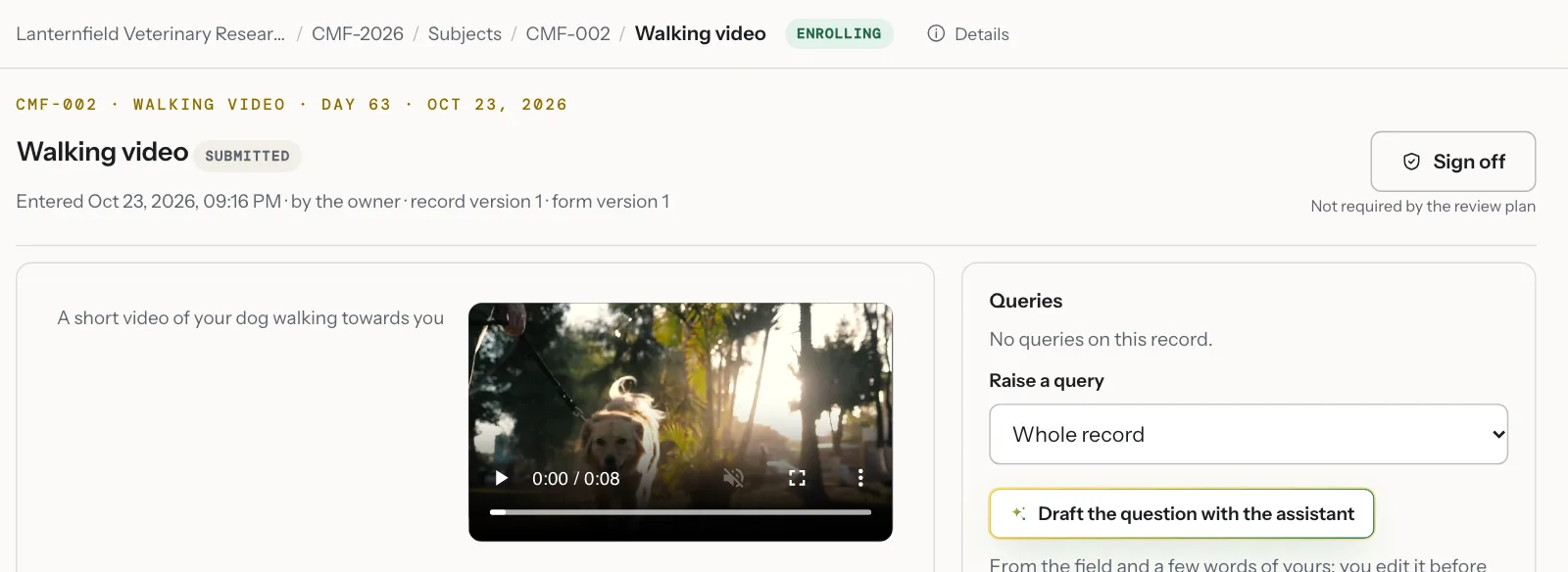
The record of a weekly walking video in the example study: the clip the owner sent, entered by the owner on the day, with the record’s receipt and the queries panel beside it.
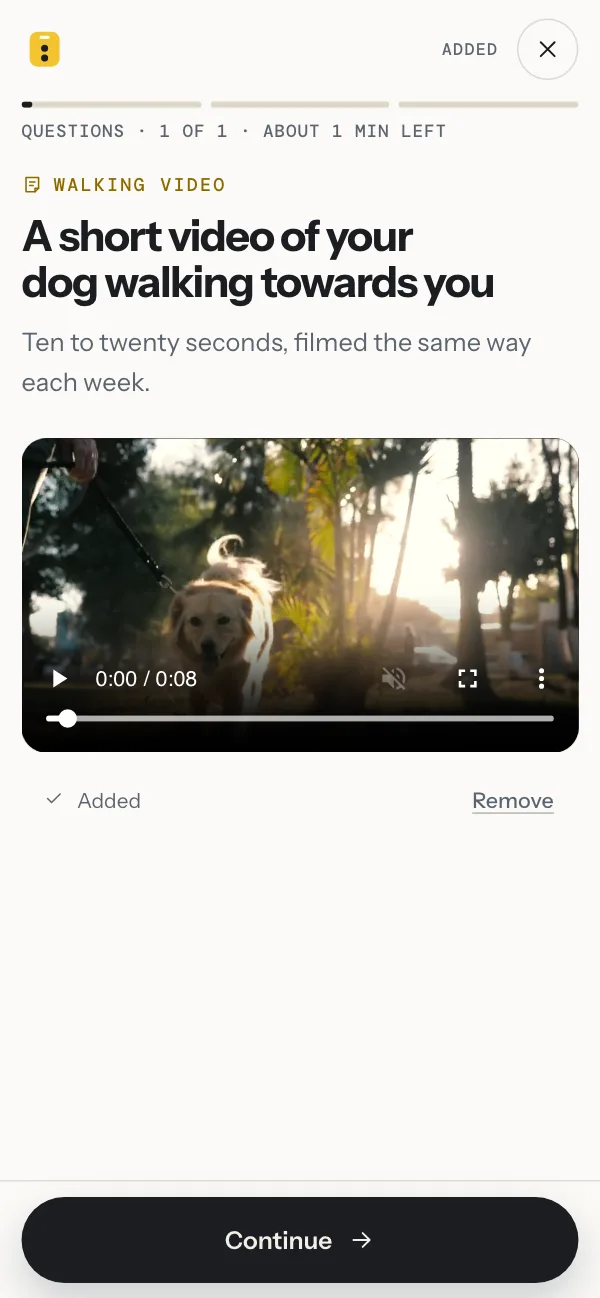
An owner’s phone in the example study, on the walking video question: the clip of the dog walking towards the camera on the lead has been added, with Continue below.

Example study CMF-2026, with a weekly walking video added for this page. The organizations, people and dogs are fictional; the clip is stock footage.

See it with your own protocol.

We open the example study, then show how yours would be set up: its forms, visit schedule and randomization.

Trust

Evidence you can check.

What a sponsor’s QA team or an auditor asks to see, shown in the product rather than described.

Audit history

Every action is a numbered entry: who, when, what and why, each bound to the one before it by its hash. The chain is checked from the first entry to the last.

Example data
The audit trail of the example study: 2,917 entries with the chain verified, each with its number, time, person, action and the reason given.

Role-based access

Six roles, access limited by site, and blinding by person. Monitors, assessors and viewers, such as a sponsor’s, never see owner identities.

Example data
The workspace team: each person’s role, the sites their access covers, and whether they see allocations.

Versions and signatures

A correction makes a new version with its reason. A signature asks for the password again and binds to the version signed.

Example data
A physical examination at version 3: the query on the body weight that prompted the correction, closed when the data changed, and the signatures, each bound to the record’s hash.

Exports you can check

One CSV per form, a data dictionary, a SAS program and a signed JSON bundle that anyone can verify offline.

Example data
Export and audit for the example study: the study archive, the JSON bundle with audit trail, subjects CSV, data dictionary, SAS program and the offline check.

What Signalment does

  • Keeps every entry, change and signature on an append-only audit trail
  • Limits access by role, by site and by blinding
  • Versions forms, protocol, consent and every record
  • Produces exports that anyone can verify offline

What your study team does

  • The protocol, ethics review and any regulatory filing
  • The content of consent and the veterinarian–client–patient relationship
  • Adverse-event reporting on the protocol’s timelines
  • Procedures, training and validation for your intended use

Security, validation and data handling

Pricing

Priced per workspace, never per study.

Monthly, in US dollars, cancellable any time. A workspace is a practice, department or company and runs several studies. No implementation fees.

Pilot

Free

Try it, run a resident’s project or a small registry.

  • 2 open studies
  • 25 subjects per study
  • 5 team members
Open a free workspace

Practice

$149 a month

A practice or a department running trials.

  • 5 open studies
  • 100 subjects per study
  • 15 team members
Start on Practice

Institution

$499 a month

A university clinical trials office or a sponsor.

  • 25 open studies
  • 1,000 subjects per study
  • 50 team members
Start on Institution

Enterprise

By agreement

Multi-site programs, a signed quality agreement and a named contact.

  • Unlimited studies
  • Sites and sponsors in one workspace
  • Quality agreement and audit support
Book a demo
  • The owner app with eConsent, check-ins and reminders
  • Randomization and blinding, with coded kits
  • The supply chain: inventory, needs per dog, shipments with labels
  • Data checks, queries, source verification and sign-off
  • The audit trail, the lock and every export

Not sure which plan fits your study? We will size it with you on the call.

Book a demo

Compare the plans

Questions

What study teams ask first.

Is Signalment 21 CFR Part 11 compliant?

It is built to Part 11: an append-only audit trail that records who, what, when and why; electronic signatures that re-check the signer’s password and bind to the version signed; access by role and by site; and exports. Compliance is a property of a study, not of software alone. Your organization keeps its procedures, training records and its certification letter to FDA. How the records are kept.

How is a study set up?

Start from a template (a 90-day observational study, a 12-week mobility trial, a 12-week treatment-outcomes study, a registry, or blank) and change the forms, visit schedule, consent and randomization to fit your protocol. Activation is a signature, with the approvals the design needs on the record. There is no implementation project; on a demo we show how your study would be set up.

Do owners need to install an app?

No. The invitation email opens the owner’s side in the phone’s browser, and it can be added to the home screen. Owners sign consent, answer check-ins one question per screen and add photos. Each owner sees only their own animal. Paper consent can be recorded too, with the scanned form attached.

Where are the data kept?

On Cloudflare’s network, stored in United States data centers, encrypted in transit and at rest. Owner identities are held apart from study data and never leave with a pseudonymous export. The data processing addendum lists every sub-processor.

We use REDCap. Why change?

You may not need to. REDCap has surveys, a participant app, an e-Consent framework and a randomization module, and a team that knows it can build a client-owned study on them. Signalment arrives with that study built for owners and animals: the owner app and eConsent, randomization with coded kits and a logged code break, hash-chained records and a lock with a fingerprint, with no server to run. Keep REDCap for what it already does for you. A longer comparison.

All questions

Demo

Book a demo

A 20-minute walkthrough of Signalment, set around your study.

What you will see

The example study
Sites and Today across four clinics, an owner check-in on your own phone, a query raised by a data check, and a sign-off.
Your study
Bring a protocol or a short description. We show how its forms, visit schedule and randomization would be set up.
What it would take
The plan that fits, what your team does and what Signalment does, and how a first study goes live.

After you send it

  1. A confirmation email arrives within a few minutes.
  2. We reply within one working day to agree a time.
  3. The demo is a 20-minute video call with the team that builds Signalment.

We use these details to arrange the demo. Privacy notice.